For Agencies

Client projects: delivered profitably

Design, digital, PR, content: agencies juggle many clients, tight deadlines and budget pressure. PathHub AI helps you deliver every engagement profitably.

Start Free See features
Context

What matters in agency projects

Client mandates run in parallel, approvals set the pace.

Scope
Change requests during a mandate are the most common reason why effort and budget drift apart.
Freigaben
Client approvals set the pace. Every late sign-off moves production and launch.
Reporting
Weekly reports for several clients take time away from delivery.
Marge
Whether a mandate is profitable only shows when planned and booked effort sit side by side.
Challenges

Typical hurdles in Agencies projects

1

Multi-client day-to-day

10+ clients in parallel, each with own deadlines and contacts. No overview in a classic task board.

2

Scope creep

Client asks grow, budget doesn't: profit gets squeezed, team works for free.

3

Resource bottlenecks

Creative capacity is limited, utilisation must be right: overbooking or idle time is costly.

4

Reporting & billing

Time tracking, actual/plan, clean invoicing and retainer reconciliation.

Lifecycle

Agency project lifecycle

From briefing to retrospective: typical phases of agency work.

Briefing
Pitch & Proposal
→
Strategy
Concept
→
Creation
Design, Copy
→
Approval
Iteration
→
Production
Assets, Print
→
Launch
Rollout, Media
→
Retro
Reporting
Cross-cutting: Time tracking · Change requests · QA · Client communication
Solution

How PathHub AI helps in Agencies

1

Workspaces per client

Data isolated, still global view across all engagements: cashflow, timeline, resources.

2

Budget discipline

Line-item budget, actuals, warnings on overrun: scope-creep visible before it hurts.

3

Resource plan

Who is busy when? Capacity visible across clients: lead can react.

4

Status agent

Weekly update for each client one-click: communication overhead drops massively.

Use Cases

Three Typical Agency Scenarios

How agencies use PathHub AI in practice: from retainer to pitch.

Retainer Client

Monthly budget, rotating mini-projects, no new pitch effort. Stakeholder map, recurring tasks and ROI reporting run per workspace continuously.

→ 4-6 h/week saved on status reports
Campaign Mandate (3-6 months)

Large contract with defined start/end. The AI auto-generates all 7 phases including budget, compliance risks (trademark law, advertising law, GDPR) and stakeholder list.

→ 60 % faster proposal creation
Pitch Preparation

Quick concept draft with realistic budget for the next pitch presentation. Risk list and stakeholder requirements on-demand per industry.

→ Pitch win rate +18 %
Example

What the AI creates from a project brief

Example: Campaign for a retail client

You write: “Campaign concept and delivery for retail client, channel mix social/display/POS, 3 months.”

Detected stakeholders

Client marketing leadClient buyingStrategy lead (agency)Creative directorArt directorCopywriterMedia plannerProductionQA

Detected compliance requirements

Trademark lawUnfair competition actGDPR for data useAdvertising regulations (where applicable)

Detected risks

Scope creepClient approval delaysMissed media deadlinesCreative quality

Generated project phases

1
Briefing & Pitch

Initial discussion, proposal phase, contract, kickoff meeting with stakeholders

1-2 wk.
2
Strategy & Concept

Market research, target audience analysis, positioning, concept development

2-3 wk.
3
Creation

Design drafts, copywriting, storyboards, first visuals and mood boards

3-4 wk.
4
Approval & Iteration

Client feedback, revision rounds, final approvals from stakeholders

1-2 wk.
5
Production

Final assets, motifs, animations, print, web implementation

2-3 wk.
6
Launch & Media

Media planning, booking, rollout across all channels, performance tracking

1-2 wk.
7
Reporting & Retro

Performance report, client presentation, retrospective, document learnings

1 wk.
Real sample plan

What the plan looks like in PathHub

PathHub created this plan from a short description: “We are a creative agency with 40 employees. For a retail client we develop and run a campaign concept: channel mix of social media, display and point of sale, running for 3 months.” Result: 7 phases, 35 tasks, 6 risks and 6 compliance items.

Schedule with 7 phases

The whole plan at a glance, phases may overlap. The Plan tab expands every task.
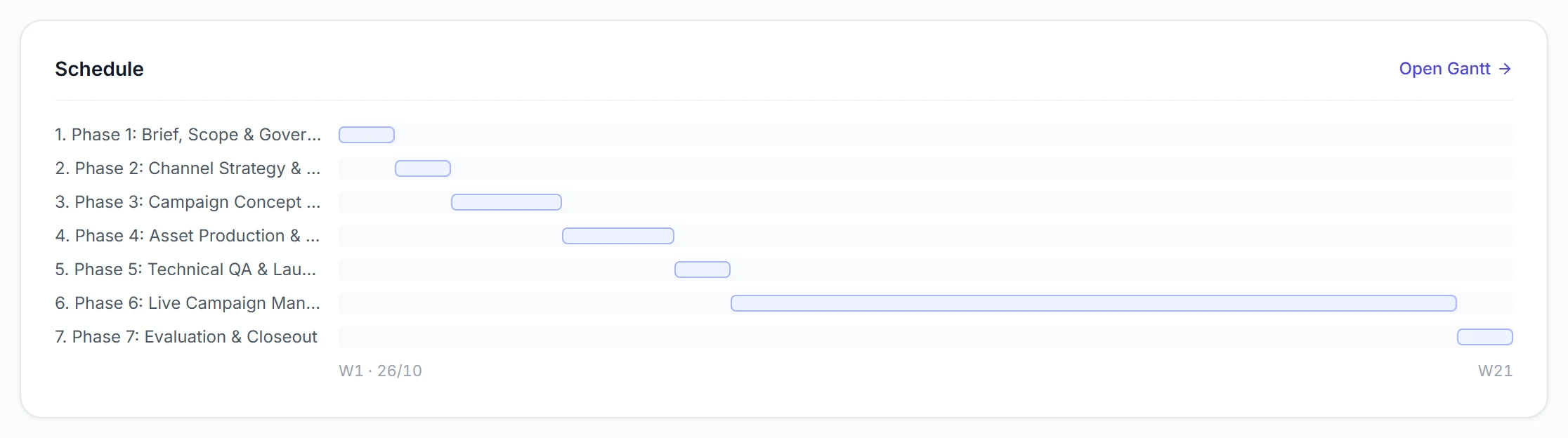
Schedule with 7 phases – Campaign for a retail client

Obligations for this initiative

Legal and industry requirements, each with owner and timing in the plan.
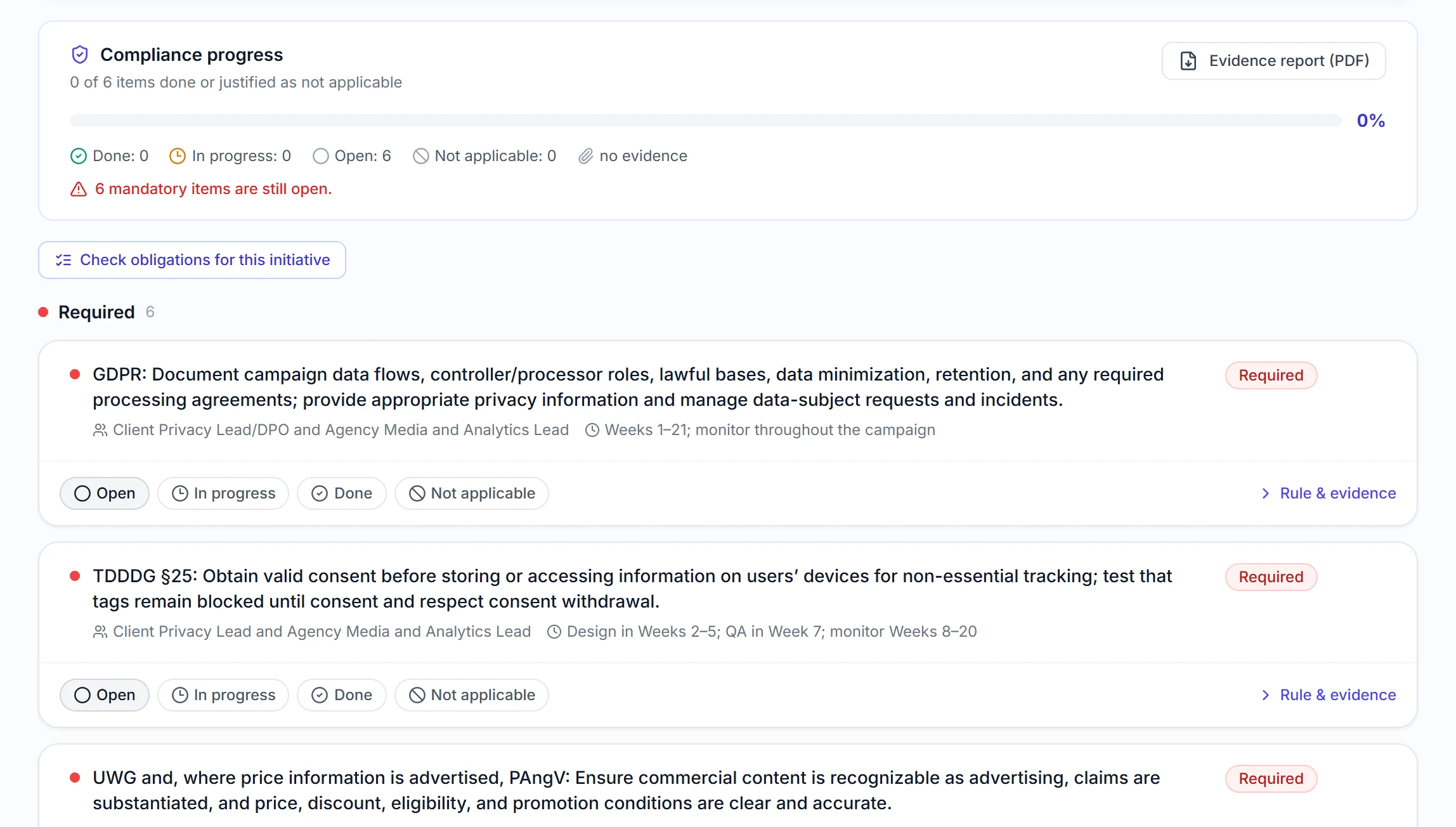
Obligations for this initiative – Campaign for a retail client

Risks with mitigations

Rated by impact, each with a concrete mitigation.
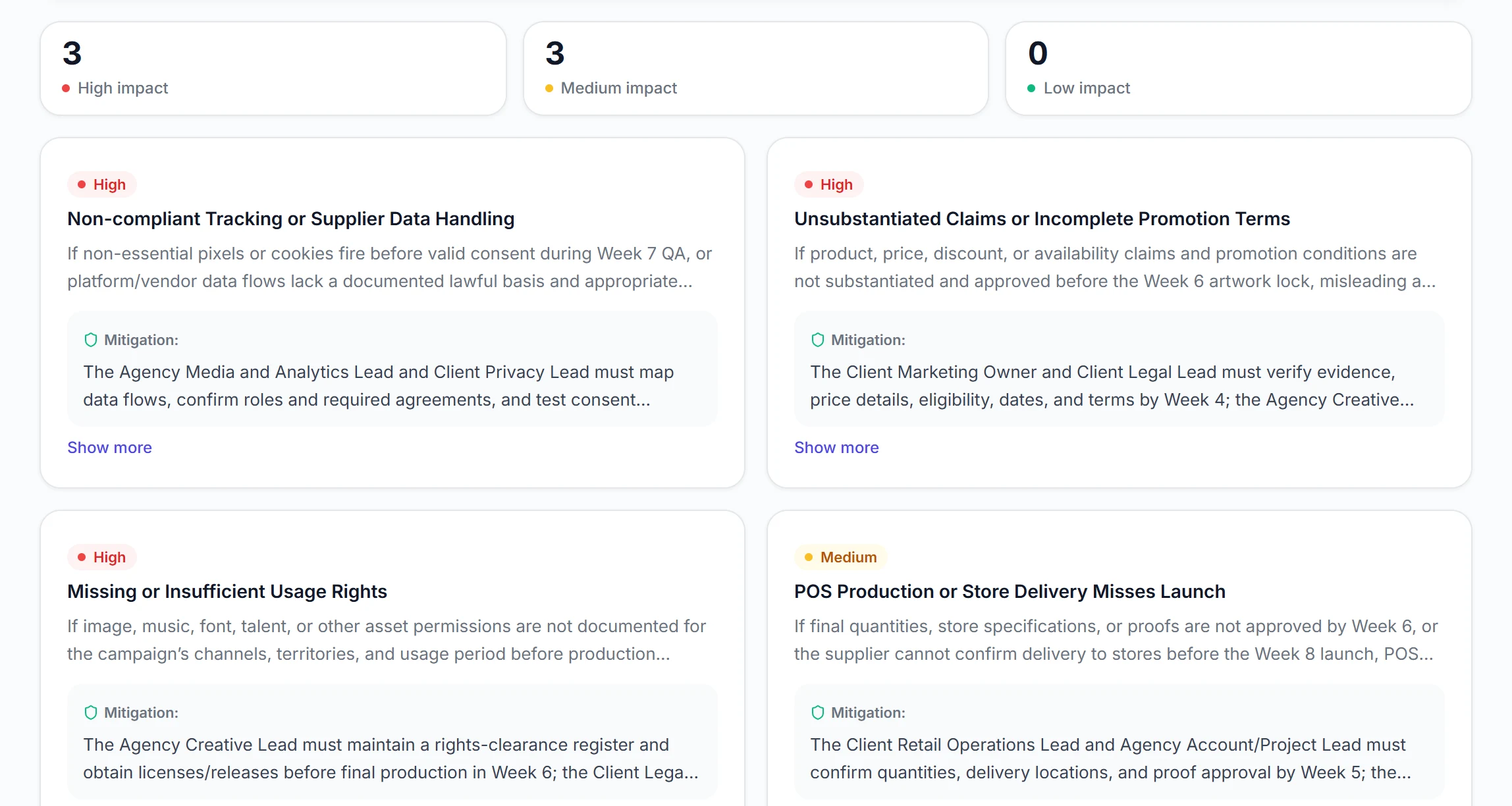
Risks with mitigations – Campaign for a retail client

Stakeholders

Roles with their responsibility and the phase from which they are needed.
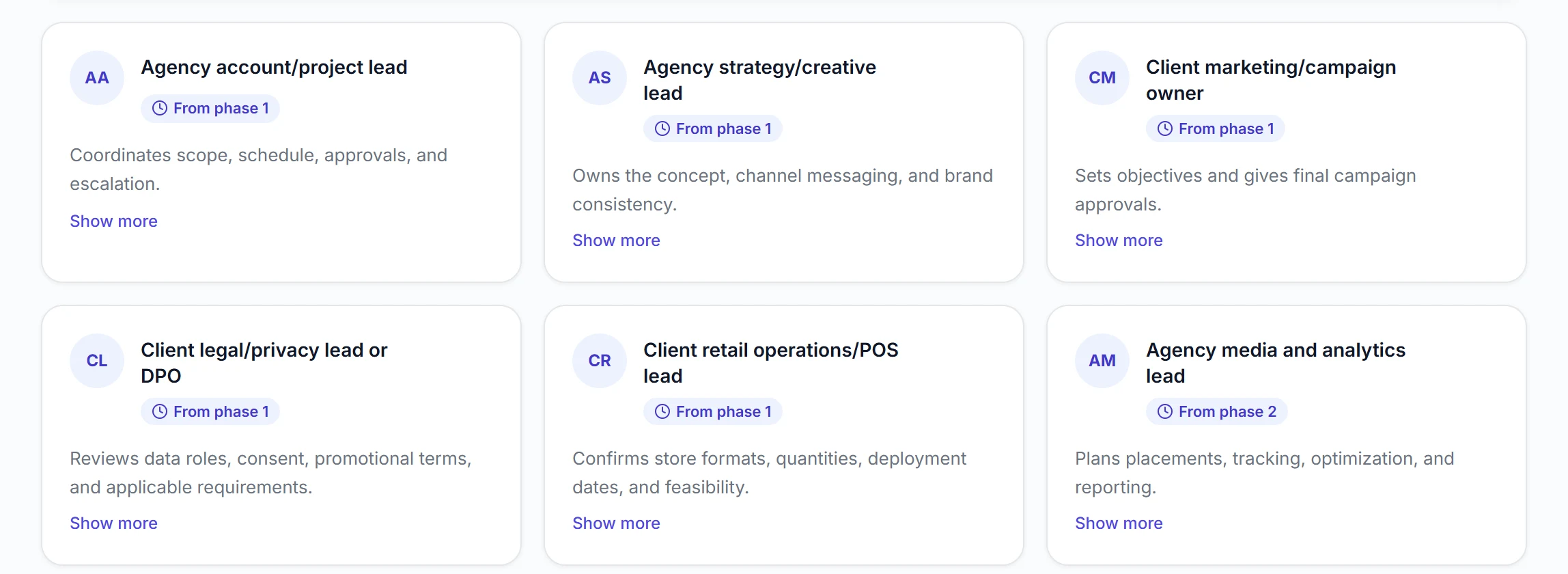
Stakeholders – Campaign for a retail client

Unedited plan, created with PathHub on 23 Oct 2026. Views shortened. Create your own plan →

Features

Relevant features for Agencies

Multi-workspace for client projects
Detailed budget items
Resource plan
RACI matrix per project
Stakeholder map & team
Weekly status agent per client
PDF export for client presentations
AI recommendations on scope risks
Comparison

PathHub AI vs. classic PM tools for Agencies

What classic tools can do, and where they hit limits in your day-to-day.

FeatureAsanaTrelloClickUpPathHub AI
AI project plan from 3 sentences——Limited✓
Industry-specific compliance detection———✓
Multi-workspace per project/client✓Boards✓✓
Detailed budget positions + actual trackingvia Add-on—Basics✓
Auto stakeholder detection———✓
Weekly status agent———✓
PDF export for reportsBasic—✓✓
GDPR-compliant + EU hostingUS-CloudUS-CloudUS-Cloud✓ DE
AI stakeholder detection (CMO, CD, etc.)———✓
Example

An example from everyday work

„We juggle 12 clients. The status agent delivers weekly reports every Friday. Used to be hours, now one click.“

Example: Managing Director, digital agency

This is how feedback from everyday work could sound.

FAQ

Frequently asked questions

Yes: one workspace per client, retainer as monthly budget, deviations tracked as extras. Cashflow stays predictable and add-ons are cleanly documented.
Budget and effort deviations vs. plan are flagged as warnings before profit is squeezed. The AI detects typical scope-creep patterns from task descriptions and client communication.
PathHub AI plans and reports: time tracking typically runs in your agency tool like Teamleader, Toggl etc., exportable to Excel. CSV import is possible to verify against the plan.
Yes: PDF export with adapted layout, no internal budget details, for client presentation. You choose per export which data goes outside (phases, timeline, risks) and which stays internal (margins, hourly rates).
Yes: the workspace architecture is built exactly for this. Each client gets their own workspace with data isolation, stakeholders, budget and KPIs. Team plan includes 1 workspace, Business plan 3.
For agency projects PathHub typically detects: trademark law, UWG (German Unfair Competition Act), GDPR for tracking/data, medical advertising law (pharma clients), media law and possibly youth media protection. The list is context-specific.
Yes, from any completed project you can create a template (phases, tasks, budget structure, stakeholder roles). For the next similar campaign you don't start at zero, just adapt the variables.
Yes: boutique agencies especially benefit because they rarely have dedicated project managers. The AI takes over much of the planning so creatives and strategists have more time for core work. The free plan covers the first 1-2 mandates.
More industries

Other industries that fit

Plan your next agency project

Try PathHub AI free. No credit card, your first Path in just a few minutes.

Start Free →