
The planning tool for
initiatives inside your company.
Describe your initiative: PathHub builds the plan with stakeholders, compliance duties and approval paths.
From the work-from-home policy to new accounting software: PathHub AI knows the stakeholders, compliance duties, and approval paths that classic tools don't. Whether you're a large company or a one-person business.


One sentence becomes a finished plan
This is how a real example plan comes together in PathHub – shortened and sped up here. In the app, creating a plan takes a few minutes. More about the AI project plan generator
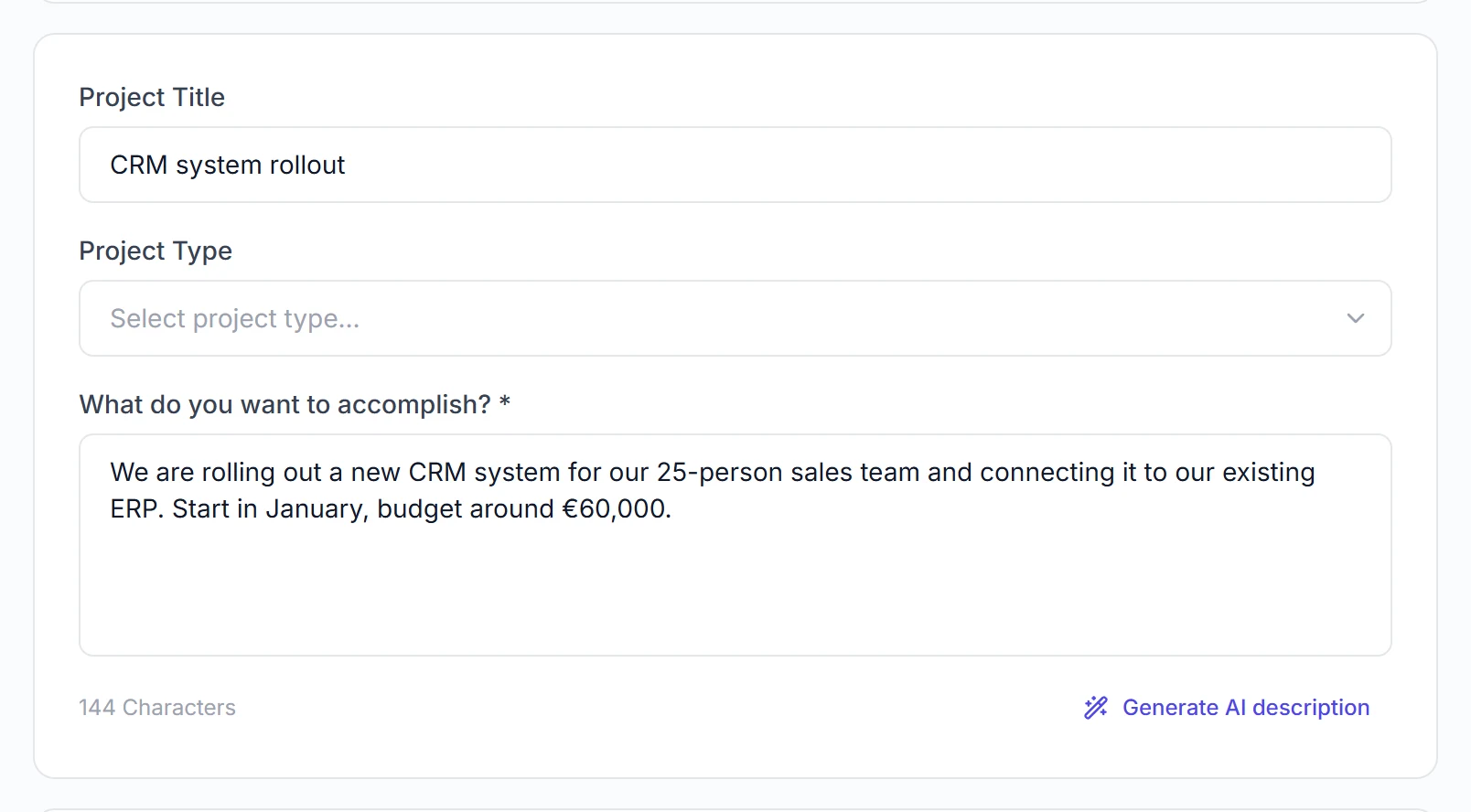
Describe your initiative in your own words: goal, scope, locations. PathHub derives the rest from your industry, company profile and regulation library.
From the executive sponsor to the data owners – each with a reason why the role is critical and the phase in which to involve it.
Lawful basis, a data processing agreement with the CRM provider, a DPIA check: every obligation gets an owner and a time window.
Phases may overlap and tasks run in parallel. The duration comes from the schedule – not from adding up every task.
Line items by category with unit, quantity and price plus a risk buffer. Plus the biggest risks with concrete mitigations.
No sign-up · the full plan also includes all tasks, milestones and the budget breakdown.
A good plan needs context
A short description is enough to get started. PathHub AI takes the rest from what you have already stored – your company profile, your connected documents and a curated library of regulations. That is why the plan fits your business and not just any.
Project description
„Migrate SAP ECC 6.0 to S/4HANA – finance, procurement and production should move too."
From you, in a few sentencesCompany context
Industry, size, works council and the systems you run – stored once in your workspace, applied to every initiative.
WorkspaceConnected sources
Google Drive, SharePoint and Slack as context – policies, internal requirements and existing documents feed into the plan.
IntegrationsRegulation library
104 reviewed rules – selected to match your industry, company size and the initiative at hand.
Maintained by PathHubWhere internal initiatives really fail
Not at execution – but because at the start nobody fully knows what is coming. Six patterns show up again and again, regardless of industry and company size.
Nobody knows every rule that applies to a specific initiative. If you are doing it for the first time, you do not know what you do not know – and you start with a plan that is missing the decisive points.
Tasks appear by gut feeling instead of method. Without phases and dependencies, work runs in parallel that actually builds on each other – and in the end everything waits on the same single step.
Whoever gets involved too late does not block on principle, but because they have to. And the later someone joins, the more expensive every change becomes.
Obligations rarely surface at the start, but shortly before go-live. Then the only choice left is between delay and a risk that someone has to sign off knowingly.
Budget and duration are roughly guessed because the line items are missing. What is not in the plan is not in the budget either – and turns into a change request later on.
Approvals need lead time: committees meet monthly, works agreements have to be negotiated. Miss those waiting periods and you lose weeks in which nobody is working.
PathHub AI automatically detects what applies to your initiative at your company size – not in week 6, but within a few minutes.
Your initiative as a process map
Next to the overview, PathHub shows every plan as a process: from start to finish, with every approval, document and obligation at the point where it applies. Everyone sees at once what comes next and what is being waited for.
Approvals and decisions as gates
Who approves, which documents are needed and what happens if approval does not come. Later steps wait until the gate is open.
Documents at the right step
Each step shows which document it produces, from the project charter to the DPA and the acceptance report.
Obligations visible in the flow
Where a requirement applies, it sits right at the step, such as GDPR Art. 35 for the DPIA or the works council agreement.
Status at a glance
What is due now, what is overdue and what is waiting. One click opens the task with its toolkit and AI draft.

Typical internal initiatives
Grouped by function – each with a real example of how PathHub AI plans it.
ERP Implementation
Structure a SAP S/4HANA rollout in minutes.
HROnboarding Program
Structure 40 new hires' onboarding.
HRRecruiting Campaign
Fill 25 positions within 6 months.
ComplianceGDPR Audit
Review 15 systems in a structured way.
ComplianceISO 9001 Certification
Achieve certification within 26 weeks.
OperationsOffice Relocation
Master a company move in 31 weeks.
StrategyMarket Expansion
Plan expansion into France & BeNeLux.
ProductProduct Development
Take a new product from concept to launch.
Planning internal projects: approach, examples and obligations →
A tool that thinks with you
Trello, Asana & co. show you what you've typed in. PathHub AI tells you what you missed, before it gets expensive.
You're working against blind spots.
- Stakeholders get forgotten, until they block the project.
- GDPR, works council, ISO, surfaces too late.
- Tasks set by instinct, not by plan. No phases, no order.
- Budget based on rough guesses, and it's never enough.
- Status reports, updates, memos: written by hand every week.
The AI thinks with you. You decide.
- Stakeholders detected automatically, including the unwelcome ones.
- GDPR, ISO 27001 & 104+ regulations on the plan from day one.
- Phases, tasks & dependencies: from your single sentence.
- Budget breakdowns with realistic ranges.
- AI agents handle status reports & memos at the press of a button.
Eight features for a plan that holds
Not 10 tabs, not 5 tools. One platform that builds, runs and watches your plan.
Type one sentence: full plan in a few minutes.
Describe your project in natural language. The AI detects stakeholders, compliance, phases, tasks and budget, and delivers a plan you can run with immediately.
- Natural language input
- Complete plan in a few minutes
- Fully editable & shareable
The right people: auto-detected.
CEO, works council, IT security, procurement: the AI knows who needs to be involved in your initiative, with roles, departments and influence rating.
- Automatic stakeholder detection
- Influence rating (High/Medium/Low)
- Including department, role and outreach suggestion
104+ regulations, automatically checked.
GDPR, ISO 27001, works council law, occupational safety, accessibility, supply chain: the AI knows which rules apply to your project, and maps them to the right phase. Then you collect evidence and management approvals, and recurring obligations continue in the compliance calendar.
- Mandatory vs. recommended requirements separated
- Phase mapping with assignees
- Library with EU focus
- Approvals, history and compliance calendar
Board view for the entire execution.
Phases as columns, tasks as cards, with assignees, time estimates and status. If you prefer Timeline or Gantt: one click, done. Move a phase and all dependent tasks recalculate automatically.
- Board, Timeline and Gantt view
- 4 nested task levels
- Status, assignee & estimate per task
From AI estimate to line item with cent precision.
Planned / Actual / Remaining in real time. Line items with unit, quantity and unit price, grouped by category, with utilization bar and variance column.
- AI-generated line items, manually editable
- Actual vs. Plan colour-coded
- Excel and PDF export incl. calculations
Catch risks before they escalate.
The AI identifies project risks from your description, industry and stakeholder context, and proposes concrete mitigations right away.
- Probability & impact rated
- Mitigations pre-drafted
- Risk heatmap as interactive tool
One-shot actions instead of prompt engineering.
12 predefined agents in 4 categories (status report, week plan, requirements doc, risk scan) plus your own agents via free-text prompt. One click, done.
- 12 predefined + custom agents
- Full project context (RAG)
- Persistent history, last 30 runs
Leaves your workspace, in any format.
If your team works in Trello, Asana or Jira, PathHub exports the entire plan with one click. For stakeholders: PDF, Markdown and Excel.
- Trello, Asana, Monday, Jira as CSV/JSON
- PDF, Excel, Markdown for stakeholders
- Complete: phases, tasks, budget, risks
Smart Planning + Full-Featured Project Management
Trello, Asana & Co. only manage what you enter yourself. PathHub AI shows you what you really need to do – and includes the PM tools.
AI Analysis
Stakeholders, compliance, risks & budget – all automatically from your description.
Learn more →Full-Featured PM
Track tasks, monitor budgets, set milestones – or export to Trello & Co.
Understand phases →11 AI Tools
RACI, SWOT, Gantt, Stakeholder Map – professional matrices from your project data.
Discover tools →You decide how to continue. Manage your project here – or export to Trello, Asana, Jira, Monday.com.
AI assistant & recommendations, right inside your workflow.
Ask the AI anything. Get your project status with concrete action recommendations, not just data, but decisions.
- Prep Phase 4 kickoff · Mon
- GDPR review with DPO · Wed
- Steering presentation · Fri
Your AI agent works directly in PathHub
Claude, ChatGPT, Gemini, Copilot and other AI assistants operate PathHub themselves through our MCP server: plan, update, review, with your permissions. Connect once by signing in, no API key.
- Generate plans from a single sentence
- Tick off tasks from status reports or commits
- Maintain risks, budget with cost entries and compliance
- 80 tools, secured by sign-in or API key
- Also with your own company AI: Microsoft Copilot Studio, Gemini Enterprise, Open WebUI or LibreChat
Example flow, simplified
What Do Companies Use PathHub AI For?
For any initiative where you can't afford to forget anything – from IT projects to compliance initiatives.
- Software Development & Releases
- Cloud Migrations
- ERP/CRM Implementations
- Security & Compliance Projects
- Infrastructure Upgrades
- Campaign Planning & Launch
- Website Relaunch
- Event Management
- Lead Generation Initiatives
- Brand Development
- Process Optimization
- Quality Management
- Supply Chain Optimization
- Product Launches
- Site Expansions
- Recruiting Campaigns
- Onboarding Programs
- Change Management
- Training Initiatives
- Compliance Training
- Business Strategy Development
- Market Entry Strategies
- Digitalization Roadmaps
- Mergers & Acquisitions
- Investment Decisions
- Product Development
- Innovation Workshops
- R&D Projects
- Prototyping & Testing
- Patent Applications
3 Steps to a Complete Action Plan
Describe your initiative – the AI detects everything you need.
Industry, size, typical stakeholders, compliance requirements – enter once, then the AI considers it automatically for every initiative.
"We want to implement a CRM" or "Conduct a new data protection audit" – the AI automatically detects stakeholders, compliance, and dependencies.
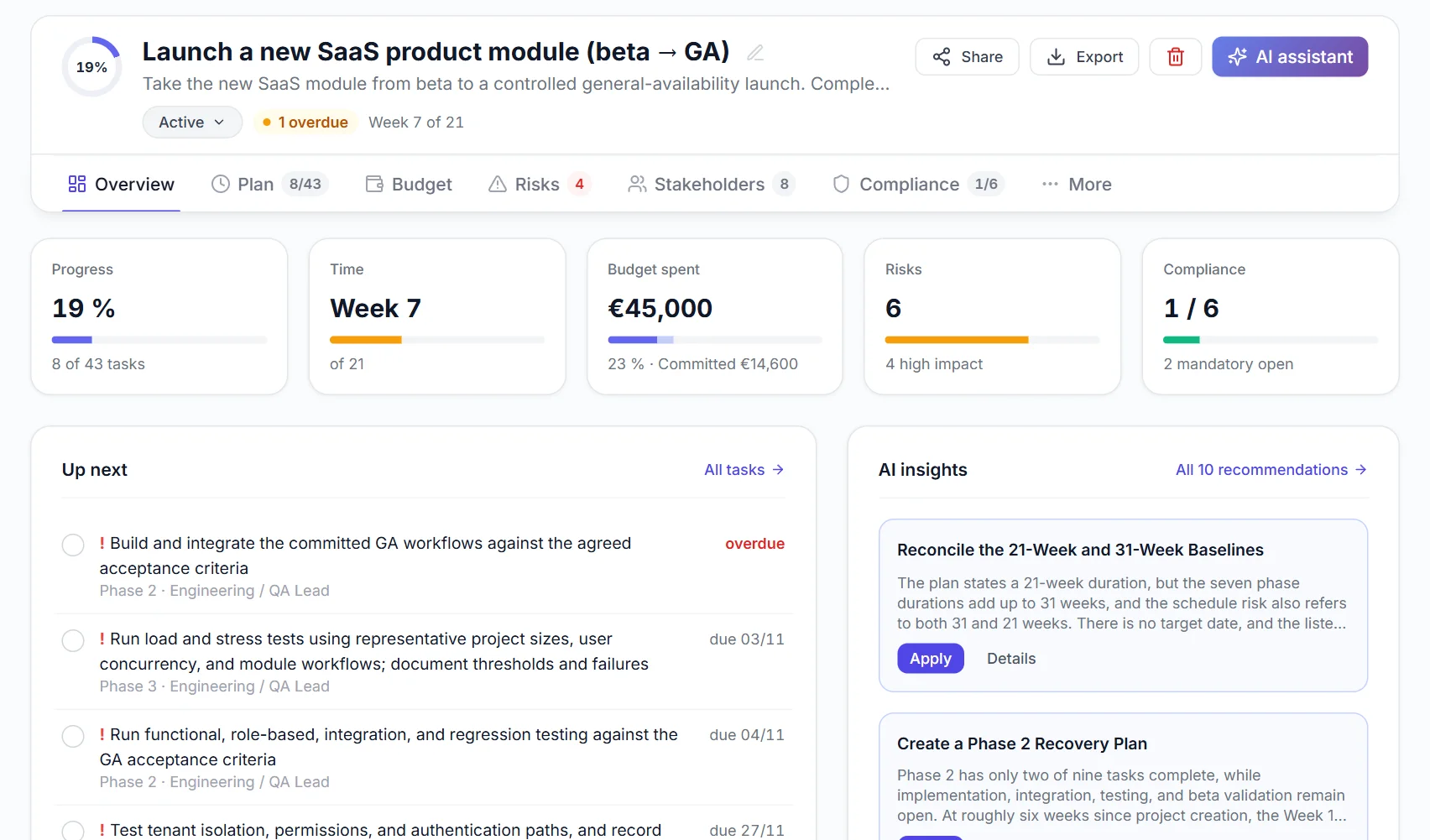
Use our full-featured PM: track tasks, budget, milestones. Or export to Trello, Asana, Jira – you decide.
 Erster Schritt Unternehmen einrichten.webp?v=20260223)
Works with your tool stack
10+ tools directly connected, 6,000+ more via Zapier – PathHub AI fits seamlessly into your existing workflow.
Google Workspace
SSO login + Drive sync for documents and calendar
Slack
Status updates and notifications directly in your channel
Microsoft 365 Soon
SSO with Microsoft account + Teams notifications
Trello
1-click export: phases become lists, tasks become cards
Asana
CSV export with sections, tasks and assignees
Jira
Issue import: epics = phases, stories = tasks
Zapier Soon
Connect 6,000+ apps: Notion, Monday, HubSpot, Airtable and more
Excel & CSV
Full plan including budget, timeline and stakeholders
Master PathHub AI and AI project management
Two curated knowledge hubs with 30+ articles, templates, and real-world use cases.
Three Project Traps PathHub Prevents
Three made-up but typical examples from everyday project work. This is how feedback could sound.
"In our last IT project, we forgot the works council – 3 months delay. With PathHub AI, that wouldn't have happened. The AI immediately recognized that we needed to involve them."
"The AI immediately recognized that our initiative requires a GDPR impact assessment – we would have only noticed during the audit. Now compliance is planned in from the start."
"We originally wanted to export to Trello – but the project management in PathHub AI is so good that we track everything here. Tasks, budget, milestones – all in one place."
How much does PathHub AI save you?
Set three values: see instantly how much time and money you save. Based on typical project workloads.
- Initial project planning8 h
- Stakeholders & compliance4 h
- Status reports via AI agent12 h
- Documents (specs, memos)6 h
- Team coordination1.5 h / person / week
Example calculation based on estimated time savings per initiative. Your actual savings depend on your team and initiatives.
Answers, before you ask.
What new users want to know: straight to the point.
What does PathHub AI cost?
The Free plan is forever free: 1 path, 1 workspace, 150 AI points per month. No credit card required. Team starts at €49/month (15 paths, up to 5 editors, 3,000 AI points). Business at €129/month (50 paths, up to 15 editors per workspace, 10,000 AI points, AI recommendations, PDF+Excel export). All plans in detail →
Where is my data stored? Is this GDPR-compliant?
Project data is stored in Germany (Hetzner, Frankfurt). For AI processing we use providers such as OpenAI and Anthropic, including in the US, covered by data processing agreements and EU standard contractual clauses. We do not use your project data for training and never sell it. Privacy policy →
Which AI does PathHub AI use under the hood?
PathHub is model-agnostic: we pick the strongest model per task, currently GPT-6 Luna for reasoning, GPT-6 Sol for structured outputs and Claude Haiku 5.5 in the AI assistant. Neither provider trains on its API customers' data (no training on your content). Your project content stays your property, and as the models improve, PathHub improves automatically.
Does PathHub AI replace my existing tool (Trello, Asana, Jira), or complement it?
Both. PathHub AI has full project management built in: tasks, phases, Gantt, budget, risks. You can run everything here. Or use it just for the initial planning, then export to Trello, Asana, Jira or Monday.com.
Does it work for teams?
Yes, from the Team plan. Invite members by email into a workspace and assign roles: Owner (full rights), Editor (can change) or Viewer (read-only). Team: up to 5 editors, Business: up to 15 editors per workspace, Enterprise: unlimited.
What sets PathHub AI apart from other AI tools?
Three things: (1) We think in complete action plans, not just individual tasks. (2) Compliance library with 104+ regulations (GDPR, ISO 27001, BetrVG, BSI, industry-specific). (3) AI agents for recurring outputs (status reports, requirements specs, stakeholder updates), and you can build your own agents with custom prompts.
Is PathHub AI suitable for my industry?
We have specialized compliance libraries and templates for IT/SaaS, manufacturing, finance, healthcare, construction, consulting and more. The AI auto-adapts stakeholder detection and regulations to your industry. Industries overview →
How long does setup take?
a few minutes to sign up, just a few minutes for your first complete action plan. Describe your project in one sentence, the AI does the rest. No onboarding, no training, no setup needed.
Is PathHub AI also suitable for client projects?
Yes – the AI planning engine works for any kind of project, not just internal ones. We are especially strong for internal initiatives with stakeholders, co-determination, and compliance requirements that classic tools miss. For client projects, you can use PathHub AI just as freely: phases, tasks, budget, and timeline can be shaped just like for any other project.
Describe your initiative, PathHub builds the plan
a few minutes to sign up, just a few minutes for a complete action plan: stakeholders, compliance, phases, tasks, budget. Everything in.